07-11-2025, 09:30 PM
Adding pictures to your posts livens things up and makes the Forum so much more interesting.
An important point to understand is that pictures that are only uploaded as "Attachments" can not be viewed by non-registered guests. It makes things frustrating for any visitors! And for registered members, they're all stuck at the end of your post.
So it's good to learn how to "Insert" your pictures into your post. You can then caption them properly and write text above and below - make it more like a little magazine article. Much more enjoyable for your fellow club members too.
Here's how you do it: (Click on any of these pictures to see a larger version)
Step 1: upload the picture as an "Attachment". Click on "Choose Files". A browse box will open. Find your picture(s) on your computer and click on it (them). Then click "Open". (Hint: you can highlight multiple files at once by holding down the Ctrl key while you left click with your mouse. They will all be uploaded together.)
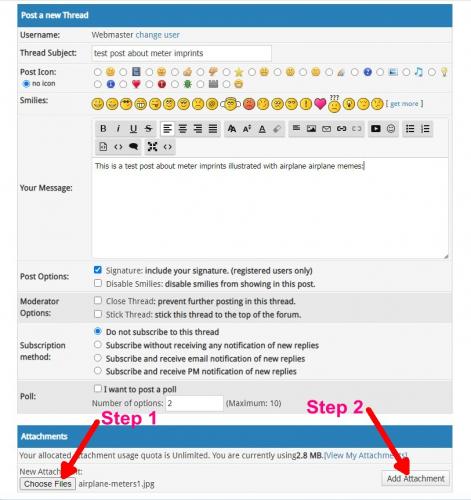
Step 2: "Choose Files" will now be followed by the number of files you chose i.e. "4 files", or the file name if it is only one file. Click on "Add Attachment"
Step 3: Place your cursor where you would like the picture to appear.
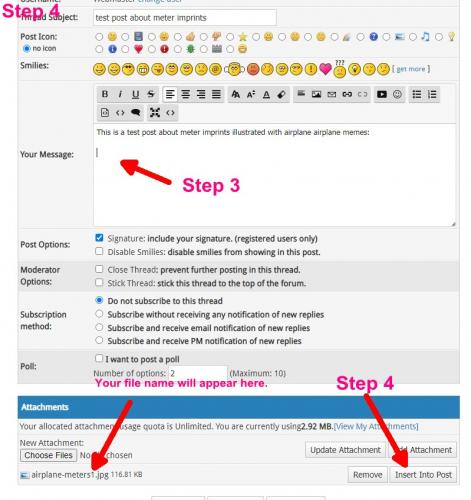
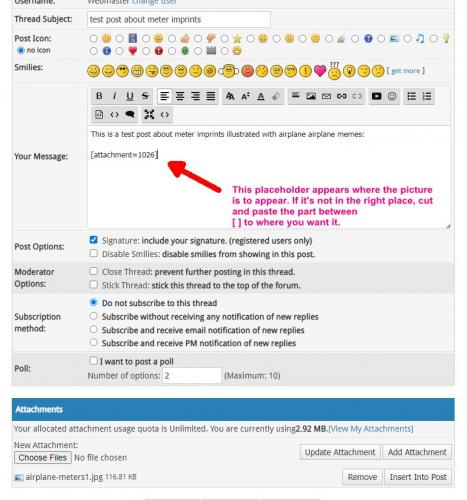
Step 4: Click on "Insert into Post" . A placeholder will appear where your cursor was located. If it ends up in the wrong place, or you want to rearrange the layout, cut and paste the placeholder (including the [ ] ) to where you want it to go.
Then just "Preview" your post, rearrange things to look nice, then make sure to "Save" the post, and you're done.

Another hint: Text immediately following a picture on the same line is annoying. Please insert your pictures on their own line and place your text either above or below.
BTW: There is a size limit on pictures. They must be smaller than 1MB (1024 KB). If you are posting pictures from you camera, you will likely have to resize them smaller. 1 MB is still a very large picture on a computer monitor!
If you have any questions, feel free to post replies here, then everybody can learn.
Roy
An important point to understand is that pictures that are only uploaded as "Attachments" can not be viewed by non-registered guests. It makes things frustrating for any visitors! And for registered members, they're all stuck at the end of your post.
So it's good to learn how to "Insert" your pictures into your post. You can then caption them properly and write text above and below - make it more like a little magazine article. Much more enjoyable for your fellow club members too.
Here's how you do it: (Click on any of these pictures to see a larger version)
Step 1: upload the picture as an "Attachment". Click on "Choose Files". A browse box will open. Find your picture(s) on your computer and click on it (them). Then click "Open". (Hint: you can highlight multiple files at once by holding down the Ctrl key while you left click with your mouse. They will all be uploaded together.)
Step 2: "Choose Files" will now be followed by the number of files you chose i.e. "4 files", or the file name if it is only one file. Click on "Add Attachment"
Step 3: Place your cursor where you would like the picture to appear.
Step 4: Click on "Insert into Post" . A placeholder will appear where your cursor was located. If it ends up in the wrong place, or you want to rearrange the layout, cut and paste the placeholder (including the [ ] ) to where you want it to go.
Then just "Preview" your post, rearrange things to look nice, then make sure to "Save" the post, and you're done.
Another hint: Text immediately following a picture on the same line is annoying. Please insert your pictures on their own line and place your text either above or below.
BTW: There is a size limit on pictures. They must be smaller than 1MB (1024 KB). If you are posting pictures from you camera, you will likely have to resize them smaller. 1 MB is still a very large picture on a computer monitor!
If you have any questions, feel free to post replies here, then everybody can learn.
Roy
https://buckacover.com << 90,000 covers 60c to $1.50 !!!
https://discountstampshop.ca << Discount Stamp Shop - The name says it all!
"The next best thing to a stamp show"